
One of the first things people want to know about a missionary is, “Where do you serve?” You can answer that with a sentence, but a map answers it in about two seconds.
A lot of your supporters have never been to the country where you serve. Some of them couldn’t point to it on a map. When they can actually see where you live and work, your ministry feels more real to them, and it’s easier for them to picture what they are praying for.
In this post I will show you three real examples of maps on missionary websites we have built, the different kinds of maps you can use, what to put next to your map, and how to make one for your own site.
Why a Map Helps Your Missionary Website
It makes your ministry easy to picture. “Mtwara, Tanzania” might not mean much to someone in Ohio. A map with Mtwara highlighted on the coast of Tanzania, inside Africa, means a lot more.
It shows the size of your work. If you serve in several cities, regions, or projects, a map shows that in a way a paragraph can’t.
It helps people pray. When supporters know exactly where you serve, they can pray for those places by name.
It builds trust. Churches and supporters can see that you have a clear focus and a plan. That matters when a church missions committee is deciding whether to support you.
It makes your website stand out. Most missionary websites only have text and photos. A good map is something people remember.
Example 1: Showing a Country and a City
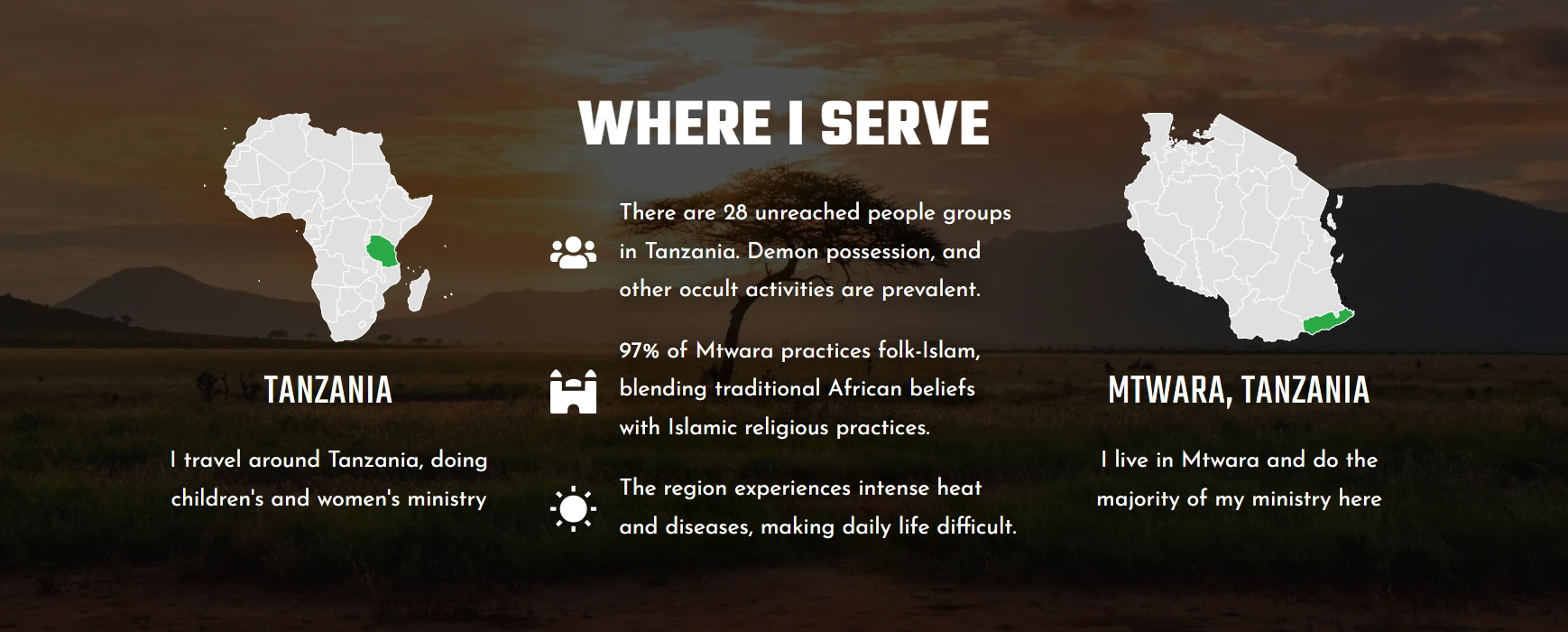
Melodie Joice is a missionary to Tanzania. Her website uses two simple maps side by side. The first shows Tanzania highlighted on a map of Africa, and the second zooms in to show the Mtwara region on the coast of Tanzania, where she lives and does most of her ministry.
This works really well because it answers two questions at once: what country she serves in, and where in that country. In the middle, she shares a few short facts about the region, like the number of unreached people groups in Tanzania and the religious background of Mtwara. Those facts give supporters specific things to pray about.
Why this works:
- Two zoom levels help people who don’t know African geography
- Short facts next to the map give people something to pray for
- A background photo of the landscape makes the section feel like the place
Example 2: Showing the Areas You Cover
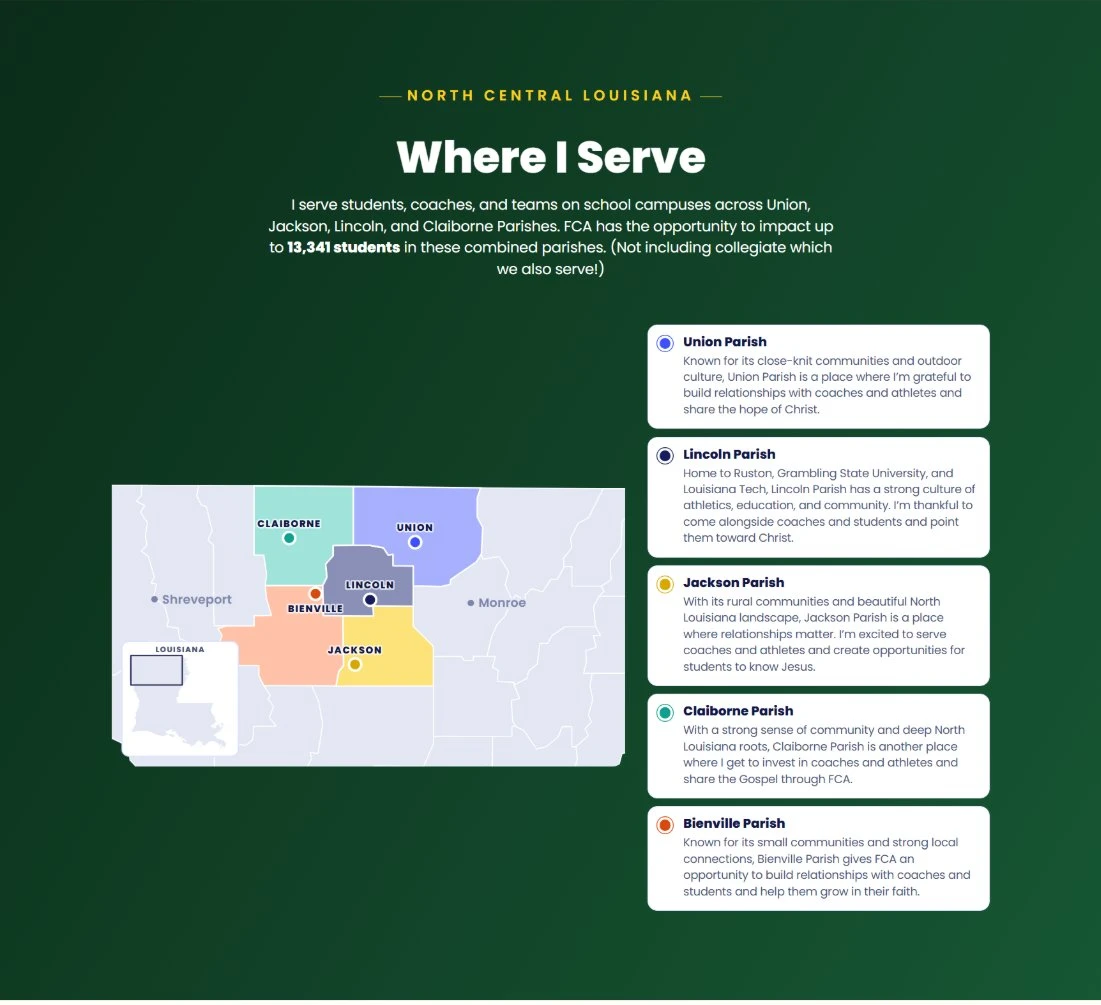
Not every missionary serves overseas. Haley Kemp serves with the Fellowship of Christian Athletes in north central Louisiana, reaching students and coaches on school campuses.
Her map shows each parish she serves in a different color, with nearby cities like Shreveport and Monroe for reference and a small Louisiana map in the corner so people know where they are looking. Next to the map, each parish has a short card that matches its color on the map and explains what that community is like.
Above the map she shares a powerful number: FCA has the opportunity to reach up to 13,341 students in those parishes. That one number shows supporters how big the opportunity really is.
Why this works:
- Colors connect each area on the map to its description
- Reference cities and the small inset map help people get their bearings
- One clear number shows the size of the opportunity
Example 3: Showing Several Ministries Across a Country
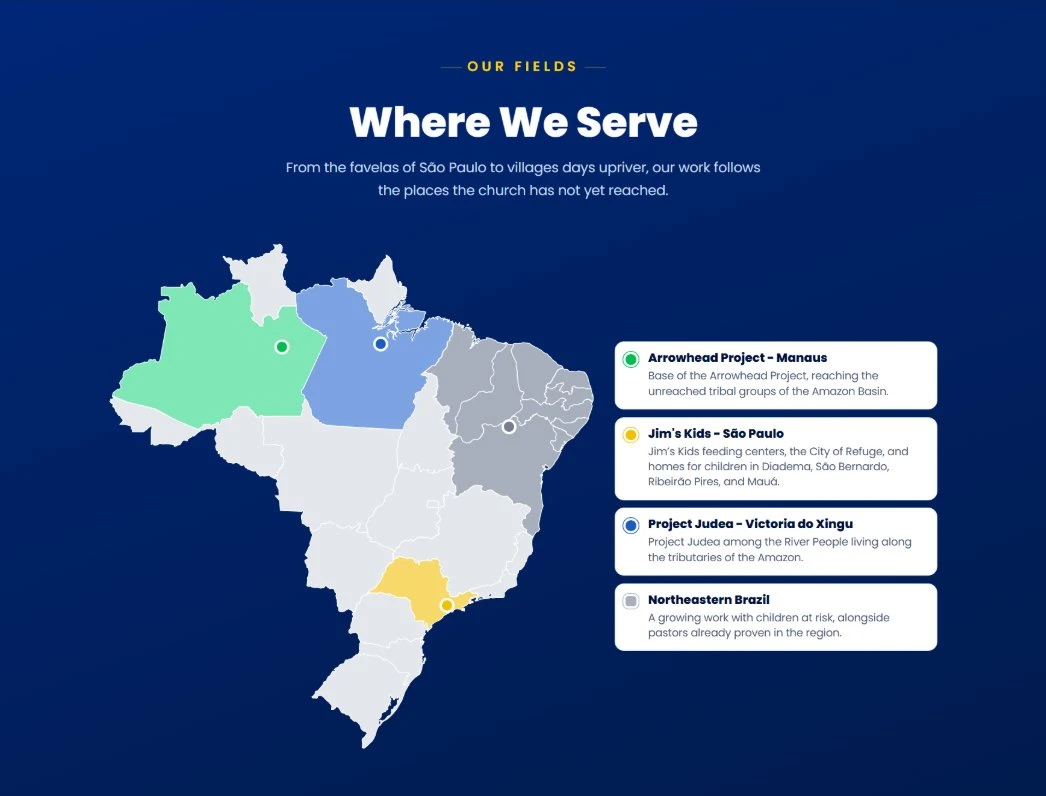
John and Kathy Hayes have served in Brazil since 1983, and their ministry includes several projects in very different parts of a very big country. Their map shows each ministry area in its own color, with a matching card that explains what happens there: the Arrowhead Project in Manaus, Jim’s Kids in São Paulo, Project Judea along the Amazon, and a growing work in northeastern Brazil.
For a ministry with several projects, this kind of map is really helpful. Without it, supporters might not understand that these are four separate works spread across thousands of miles.
Why this works:
- Each project gets its own color, dot, and card
- It shows how spread out the ministry is
- Supporters can see at a glance which project is where
See the Hayes Ministries website here.
Types of Maps You Can Use
There are a few different kinds of maps that work well on a missionary website. Pick the one that fits your ministry best.
A country on a continent. Simple and clear. Great if you serve in one country that many supporters don’t know well.
A zoomed-in region. Shows the city, state, or province where you live. Works well paired with a country map, like Melodie’s.
Several highlighted areas. Good if you serve in multiple regions, parishes, counties, or cities, like Haley’s.
Multiple ministry locations. Great for ministries with different projects in different places, like the Hayes family.
A travel or outreach map. If you travel to different villages or do a lot of outreach trips, a map of where you have been can show how far the Gospel is spreading.
A people group map. If your focus is a specific language or people group, you can show where that people group lives.
What to Put Next to Your Map
A map by itself is nice, but a map with a little context is much better. Here are some things you can add:
- A short description of each area and what you do there
- A few key facts, like population, number of churches, or percentage of believers
- Prayer points for each area
- The number of people you have the opportunity to reach
- Photos from each location
- A link to read more about each ministry or project
Keep it short. Two or three sentences for each area is plenty.
Tips for a Great Missionary Map
Keep it simple. You don’t need every road and river. Show only what helps people understand where you serve.
Use your website’s colors. A map that matches the rest of your site looks much more professional.
Make it work on phones. A lot of your supporters will see your map on a small screen, so make sure the labels are still readable.
Add reference points. Showing a well-known city nearby, or a small inset map of the whole country, helps people get their bearings.
Be careful if you serve in a sensitive country. If your safety or the safety of local believers matters, don’t show the exact city or neighborhood where you live. A larger region, or just the country, is safer. Always follow your mission agency’s security guidelines.
How to Make a Map for Your Missionary Website
You have a few options, depending on how much time you want to spend.
Free map tools. Sites like MapChart let you color countries, states, or regions and download the image for free. This is a quick way to make a simple map.
Google My Maps. You can make a free custom map with pins and embed it on your website. It’s interactive, but it looks like a standard Google map, so it won’t match your website’s design as well.
Canva. If you already use Canva, you can find map graphics and add your own colors and labels.
Have it built for you. The maps in this post were all designed as part of the websites we built, so they match each missionary’s colors and style, look good on phones, and include the cards and facts that go with them.
Want a Map Like These on Your Website?
At Missions Websites, we build complete websites for missionaries and ministries, including sections like these “Where I Serve” maps. Every website is built to help your supporters understand your ministry, pray for you, and give.
You can start with a $5 sample website to see what yours could look like, or read our post on what to put on a missionary website for more ideas.
Frequently Asked Questions
Should every missionary website have a map?
I would recommend it for most missionaries. It’s one of the easiest ways to help supporters understand where you serve. If you serve in a sensitive country, a map of the country or a larger region is still helpful without sharing too much.
Where should the map go on my website?
A “Where I Serve” section on your homepage works great. You can also put a larger version on your About or Ministry page.
Should my map be interactive?
It doesn’t have to be. A clean, simple map with cards next to it is often easier to read than an interactive map, especially on a phone.
Can I show where I live on my map?
It depends on where you serve. In most places it’s fine to show your city or region. If you serve in a country where Christian work is restricted, don’t show your exact location, and check with your mission agency first.
What if I serve in several countries?
You can use a map of the whole region with each country highlighted, or a separate small map for each country with a short description of your work there.